How to Read Your Solar Meter in Alberta
One of the questions we get most often after install: “How do I actually see what my system is doing?” Monitoring apps are great, but you don't need one to verify your numbers. Every Alberta home on net billing has a bidirectional utility meter that shows your two key values directly on the meter face. Once you know what the digits mean, you can read your production, your consumption, and the net of the two without any app, login, or extra hardware.
Why Your Meter Has Two Registers
Before solar, your meter only had to track one thing: the electricity you pulled from the grid. After solar, the meter has to track two things separately because Alberta's Micro-Generation Regulation requires it. The utility needs to know:
- Consumption, the electricity you pulled from the grid (typical when the sun isn't shining or your home is using more than your panels are making)
- Production, the electricity you exported to the grid (when your panels are making more than your home needs)
You're billed on consumption and credited on production, both at the rates spelled out on your bill. The meter tracks each one separately so the math is honest in both directions. This is the “net” in net billing.
The Two Numbers Are Cumulative
The most important thing to understand: both registers are running totals. They don't reset, they don't roll over month to month, and they only ever go up. Think of them as two odometers, one counts kilowatt-hours pulled from the grid since the meter was installed, the other counts kilowatt-hours pushed to the grid since the meter was installed.
That means a single reading by itself doesn't tell you much. What tells you something is two readings, taken at different times, and the difference between them. If the production register reads 4,250 kWh today and 4,580 kWh next week, you produced 330 kWh in that week.
What to Look for on the Meter Face
Alberta wire-service-providers don't all use the same meter, so the labels differ slightly depending on who owns the lines to your property. Two conventions cover the vast majority of residential micro-gen homes:
If your wire owner is ATCO Electric, FortisAlberta, or EQUS, you almost certainly have a Honeywell / Elster bi-directional meter. The LCD cycles through three values:
- Code 01, total kWh received from the grid. This is your consumption register.
- Code 46, total kWh delivered to the grid. This is your production / export register.
- Code 888, a segment-check test pattern. The meter lights every digit to confirm the display is working. Skip past it.
If your wire owner is EPCOR (most of Edmonton), the meter uses text labels instead of numeric codes:
- DEL (delivered), kWh delivered to your home. This is your consumption register.
- REC (received), kWh received by the grid. This is your production / export register.
If your wire owner is ENMAX (Calgary), you almost certainly have an ENMAX-branded Honeywell Type RUD bi-directional Form 2S meter (look for “ENMAX 958400” and “Honeywell TYPE RUD” on the nameplate). It's the same Honeywell hardware family ATCO and FortisAlberta use, but ENMAX programs it to show direction with arrows instead of the 01 / 46 codes. The LCD shows TOT (Σ) alongside kW·h, what changes between cycles is the cumulative number and a small directional arrow at the bottom of the display:
- Right arrow (→), total kWh delivered to your home from the grid. This is your consumption register.
- Left arrow (←), total kWh delivered from your home to the grid. This is your production / export register.
The label “TOT (Σ)” just means “total kilowatt-hours, cumulative”, both registers carry that label, the arrow is what tells you which one you're looking at. For most solar homes the arrow-right number will be substantially larger than the arrow-left number; that gap is consumption you didn't self-supply with solar. The display auto-cycles every few seconds. If you want the official walk-through, ENMAX metering is at meters@enmax.com or 403-662-3250.
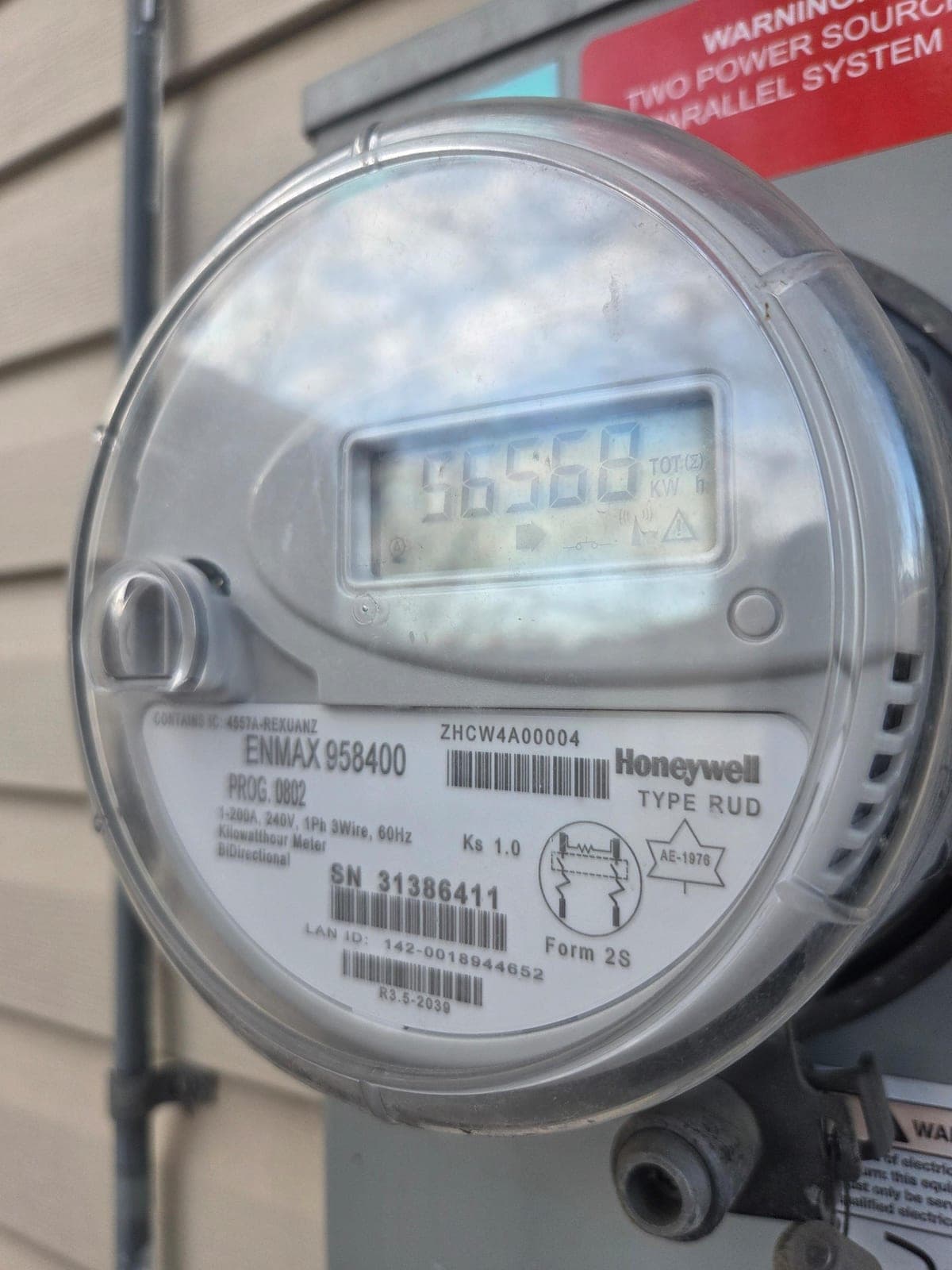
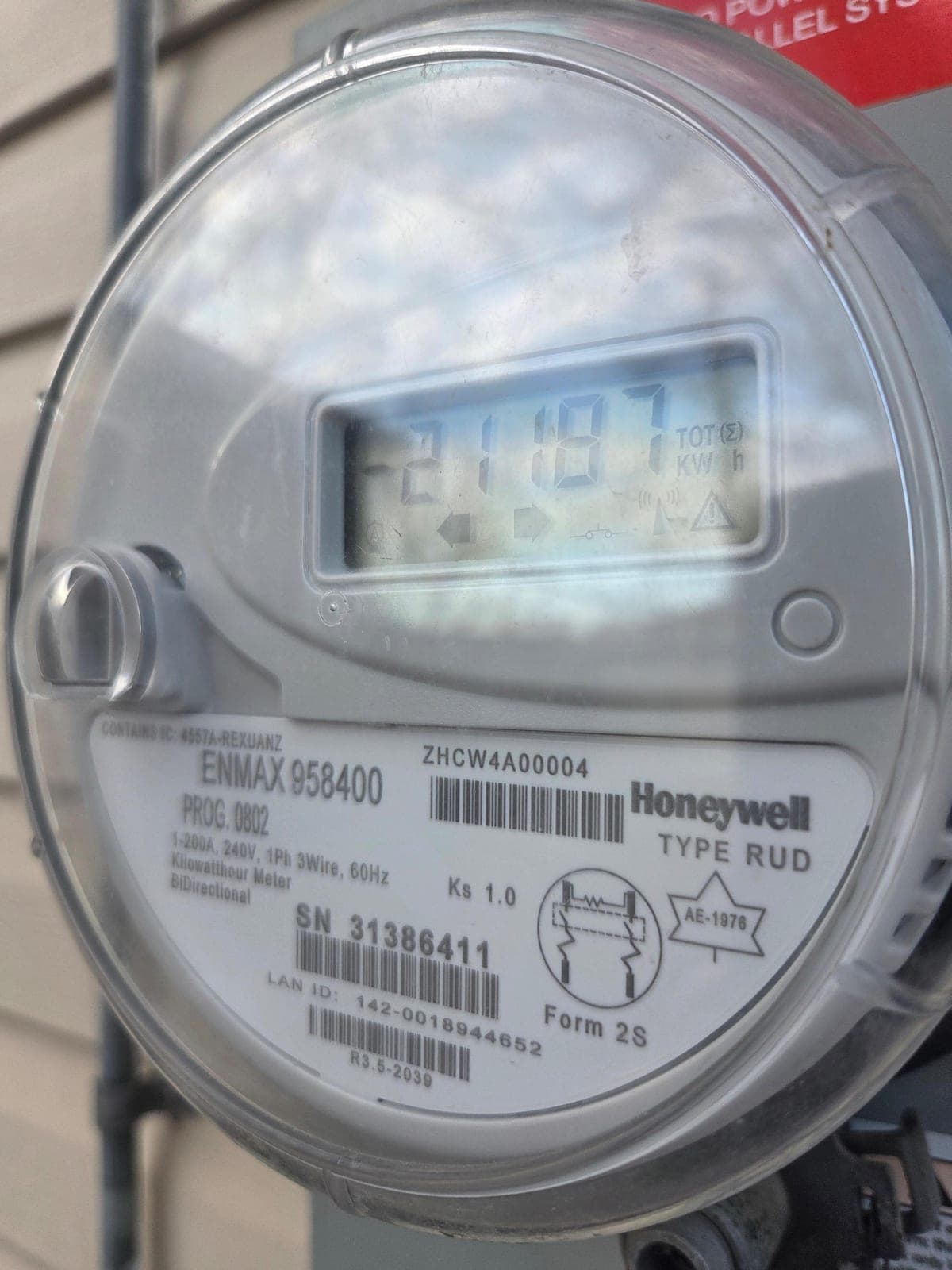
On any of these meters, the display auto-cycles. If yours doesn't, there's typically a small button or magnet contact on the front face that advances it. The two cumulative kWh values are the only ones you need for net billing math.
The Math: Net Billing in One Subtraction
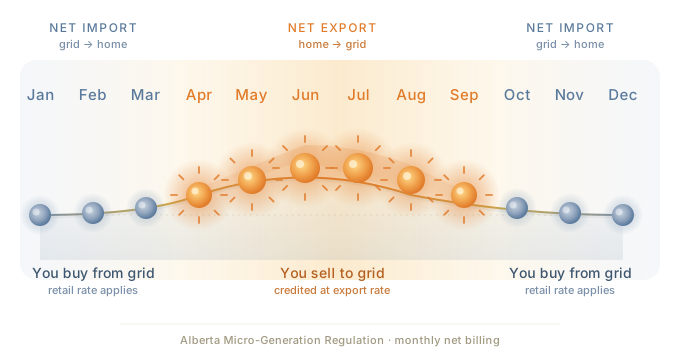
Once you know the two registers, the calculation is simple. Suppose at the start of the billing period your meter reads:
- Consumption (delivered to home): 12,400 kWh
- Production (delivered to grid): 3,150 kWh
And at the end of the billing period it reads:
- Consumption: 12,720 kWh
- Production: 3,460 kWh
That tells you, for that period, you pulled 320 kWh from the grid (12,720 − 12,400) and exported 310 kWhto it (3,460 − 3,150). Your bill multiplies those two numbers by the consumption rate and the export credit rate respectively, plus the fixed delivery charges. Compare those numbers to your invoice and they should line up almost exactly, small differences come from when the utility actually reads the meter versus when the billing cycle technically closed.
Why You Don't Need a Monitoring App for This
Inverter monitoring apps (SolarEdge, Enphase, etc.) are useful: they show panel-level performance, alert you to faults, and graph production by the minute. But for the question most homeowners actually want answered, “is my system doing what it's supposed to do?”, the utility meter is the source of truth.
The reason: your utility bill is calculated off the utility meter, not the inverter. Inverter readings show what your panels produced; the meter shows what was actually exported and what counts for billing. The two numbers should be similar but they won't match exactly because some of your production gets used by your home directly (it never touches the meter at all).
If your inverter app says you produced 800 kWh this month and your meter's production register went up by 500 kWh, that's expected, the missing 300 kWh was self-consumed (your home used it the moment it was generated). That self-consumption is actually your most valuable production: every kWh your home uses directly is a kWh you didn't have to buy at the consumption rate.
How Often Should You Check?
Once a month is plenty. Take a phone photo of the meter face on the same day each month, the day your bill closes is a good anchor. Within five minutes you'll have a personal log of production and consumption that's independent of any app, login, or third-party service. If something ever looks off (a sudden drop in production, a spike in consumption), you have the data to ask a focused question.
If you'd rather not track it manually, the inverter app is fine and we'll set you up with monitoring during your install. But the option to verify everything off the meter face directly is yours, and it doesn't cost anything to use.
What Your Bill Will Show
Your retailer's bill will reproduce the same two numbers (consumption and export) for the billing period, plus the delivery and admin charges. The line items vary by retailer but every Alberta net-billing invoice has to break out:
- Energy delivered to your home (kWh) at the consumption rate
- Energy delivered to the grid (kWh) at the export credit rate
- Delivery, transmission, and admin charges (fixed and per-kWh)
If those numbers don't match what you read off the meter, the bill is wrong, not the meter. The meter is the regulated source of truth. In our experience the bills are accurate, but having two readings of your own makes it easy to confirm.
Key Takeaways
- Your Alberta net billing meter has two cumulative registers: consumption (from grid) and production (to grid).
- Both registers only go up. To see what happened in a period, read twice and subtract.
- ATCO / FortisAlberta / EQUS meters label the registers with codes 01 (consumption) and 46 (production); EPCOR meters label them DEL and REC; ENMAX meters show TOT (Σ) with a right arrow (consumption) or left arrow (production).
- Inverter apps and meter readings won't match exactly, the difference is energy your home self-consumed, which is the most valuable kind of production.
- The utility meter is the regulated source of truth for billing. Your bill should reconcile to the difference between two meter readings.
- A monthly photo of the meter face is enough to verify everything yourself, no app required.
Sources & Utility References
The codes and conventions on this page were verified against each wire-service-provider's own published documentation. If you want to drill into your specific meter, start with your utility's reference page below:
- FortisAlberta, Reading Your Bi-Directional Meter (PDF), the canonical source for the 01 / 46 / 888 code convention used across Honeywell / Elster meters.
- EPCOR, How to Read Your Meter, covers the DEL / REC text-label convention used on most Edmonton meters.
- ENMAX, Your Electrical Meter, meter-reading entry point for ENMAX customers; the TOT (Σ) + arrow convention above was verified against ENMAX 958400 / Honeywell Type RUD bi-directional meters in the field. Metering team: meters@enmax.com or 403-662-3250.
- EQUS, Microgeneration, uses the same Honeywell / Elster meter family as ATCO and FortisAlberta (01 / 46 / 888 codes).
- ATCO Electric, Micro-Generation, ATCO's micro-gen overview; meter family matches the 01 / 46 convention above.
- Alberta Utilities Consumer Advocate, Reading Your Meter: province-wide consumer guide covering meter types, smart meters, and how to dispute a bill.